Services

I provide a range of professional digitisation, image editing and retouching services, from subtle adjustments to detailed restoration and repair work. Whether you’re working with contemporary photographs or historical material, I tailor my approach to suit your images, your needs, and your intended use. If you don’t know what treatment your images need, I can help you figure that out too!
Below you’ll find descriptions of scanning, image enhancement, retouching and specialist services like image repair and object cutouts, along with pricing, workflow and what it’s like to work with me. Feel free to read through or jump straight to whichever section you need.
New clients with five or more images can request a free proofing sample to see if my work is suitable for their needs before deciding how to proceed.
Core Services
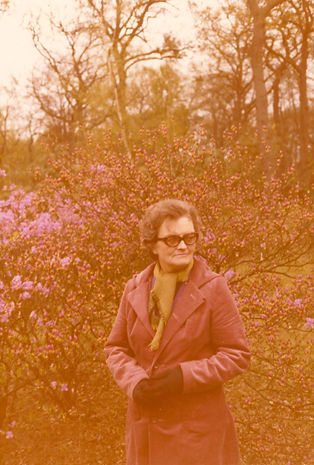
Core Services cover the kinds of adjustments that can help images to look balanced, coherent and well presented, without changing their essential character. Part of this includes broad global enhancements, such as adjusting exposure, colour balance, distortion and noise levels across the whole image. I also offer more localised retouching to remove minor distractions or small areas of damage. You can see examples of both types of work on my Portfolio page.
My emphasis is on careful, non-destructive editing and individual judgement rather than automated processing. While some adjustments can be applied across groups of images, each photograph is reviewed and refined individually to ensure any changes are appropriate and beneficial.
Used by kind permission of Elinor Parker

Used by kind permission of Elinor Parker
Image Enhancement
This is where I start with most projects. Image enhancement includes:
Adjusting exposure, contrast and colour balance
Reducing noise, sharpening and bringing out detail in over- or under-exposed areas
Improving overall visual clarity, especially in faded images
Straightening and cropping where needed
Preserving any available descriptive information (e.g. date, location, photographer, subject) in the image file metadata
This type of work is ideal for improving the quality of clean digital images or scans, and can be done quickly and efficiently across large batches.


Used by kind permission of Elinor Parker

Used by kind permission of Elinor Parker
Retouch
Retouching involves more detailed work, removing distracting elements within an image to clean it up without altering its essential character. This is particularly important when preparing images for print, or viewing at larger sizes. Retouch work may include:
Removing dust, fine hairs, sensor spots, and minor surface damage
Cleaning up backgrounds and darker areas
Repairing small tears or creases
As a heritage photographer my approach is always sensitive, for example where imperfections in an image tell part of the story I may recommend keeping them. The final editorial decision is always yours, however, and as with all my work original files are preserved and edits are fully non-destructive.


Specialist Interventions
Most images can be substantially improved with enhancement and/or retouching only, but some photographs or use cases call for more specialist interventions. This is typically the case where there is significant damage to an image, or for highly specific output requirements.
What’s possible and how difficult it is depends on the nature and condition of the image, so suitability is always assessed on an image-by-image basis. Since the amount of time taken to do this type of work is so variable, once work is agreed prices are charged per hour rather than per image (see Pricing). Two of the more common interventions of this type are image repair and object cutouts. You can see further examples of both types of work on my Portfolio page.

Used by kind permission of Elinor Parker
Used by kind permission of Elinor Parker

Used by kind permission of Elinor Parker
Image Repair
Digitised prints or documents affected by major damage can be repaired. This may include:
Large marks, extensive creasing, major scratches or fading
Stains, discolouration or water damage
Torn or missing sections
The complexity and difficulty of the work needed to repair an image, and the time needed to carry it out, depend largely on the nature and extent of the damage. Suitability of an image for repair efforts must be assessed individually; I’ll flag suitable candidates during the initial enhancement stage and discuss options with you.


©Alfred Gillett Trust
©Alfred Gillett Trust

©Alfred Gillett Trust
Object Cutouts
Cutouts involve separating part of an image (typically the main subject or another object) from its background. This allows different treatments to be applied to either, or removal or replacement of the background. This can be particularly useful for graphic design projects or publications, when you may need an object cut out to transparency or a coloured backdrop. Depending on your needs and the complexity of the object, this can be done with a high level of precision or a quicker method if the project allows.

©Alfred Gillett Trust

©Alfred Gillett Trust
Working With Me
The best place to start is a short conversation about your images, so we can agree on the right level of work and a timeline that suits your project. Please contact me by email at info@kieroncheek.co.uk or use my Contact page.
Getting Your Images to Me

If you already have good-quality digital images of your original prints or negatives then you can send these to me online. When we agree to work together, I will set up secure shared cloud storage which we can use to send files to each other. I accept most mainstream image file types, although RAW, DNG or high-resolution TIFF files (300ppi or more) give best results.
If you don’t have good-quality digital images of your photos, I can create them for you. Physical prints can be sent by recorded post or secure courier, which we will arrange once we agree to work together. I will scan your prints, slides or negatives and return them to you immediately once scanned. On delivery I will supply a copy of the untouched original scan as well as the processed and enhanced versions that I will create, both saved to your preferred file size and format.
If you’re comfortable scanning your own images and want maximum quality, I suggest the following scanner settings:
File type/format: TIFF
Colour mode: RGB
Colour profile: Adobe RGB (1998)
Bit depth: 48 (aka 16 bits per channel)
Resolution: 300ppi for finished version the same size as the original, or 600ppi for finished version twice original size
Effects, filters and compression: None
Workflow And Tools

I handle every print as I would a museum object, and every digital image with care and precision, using non-destructive workflows to preserve the integrity of original files.
I use a high-resolution “archive grade” EPSON scanner to capture extremely detailed, colour-accurate scans of prints, slides or negatives. I then copy the scans and carry out all enhancement, retouch and editing work on the copies, leaving the original scans untouched.
My work is carried out using industry-standard photography tools such as Adobe Lightroom and Photoshop. My scanner and EIZO monitor are regularly calibrated using Calibrite sensors and targets, giving me a fully colour-managed professional workflow. I’ll deliver your edited images in whatever formats you need, including:
High and low resolution versions
Layered TIFF or PSD files
Custom sizes for print, web or archive use
I’ll keep you informed of progress at key stages, and notify you immediately of any issues or questions. Once your images are delivered, you’ll have up to three rounds of revisions at no extra charge so we can fine-tune everything to your satisfaction.
None of my work affects ownership or copyright of images, so you retain all existing rights over the original image files and any additional enhanced versions I create through my workflow. I can also ensure that your copyright line and image credit is saved in the image metadata if required.
New clients submitting five or more images can request a free proofing service: I’ll edit a sample selection and return them at no charge so you can assess the quality before deciding to proceed.
Pricing
Scanning: £1.93 per image, plus postage and packing costs for your prints or transparencies
Image enhancement: £3.08 per image
Retouch: £5.62 per image
Image repair, object cutouts and other advanced edits: £36 per hour, 1 hour minimum
Next Steps
Not sure what kind of treatment your images need? I’ll be happy to take a look and advise. You can contact me by email at info@kieroncheek.co.uk or via my Contact page.
Take a look at my Portfolio page to see further examples of my work.
Find out more about my background and approach on my About Me page.